 Smarti Board
A smarter board
for the way you think.
Smarti Board is an infinite idea board for strategy and product work — a graph of ideas and connections you shape by hand, with autosave, find & replace, print, presentation mode, templates, touch and hand control underneath — plus a project-folder import that maps a codebase onto the board, AI pass optional. The Smarti Assistant is the enhancement, not the requirement: one suggestion at a time, never on the board until you accept it — and any board can be marked private so it never reaches a model at all.
Windows · macOS · Linux installers — or git clone → ./start.sh · one SQLite file · AGPL-3.0 · all downloads ↗
launch on dev-tool roundups×
a weekly digest email×
team workspaces×
Wave at it.
Your webcam becomes the board's navigator. Pinch and move to pan. Pinch with both hands and spread to zoom. Hold the edge, and the board keeps scrolling. Every frame is read on your own machine — nothing uploads, nothing records.
Yes — it's named after that Jarvis.
launch on dev-tool roundups
a weekly digest email
team workspaces
why teams leave
from the waitlist
On your machine
Hand control runs a local tracking model inside the app itself. No cloud, no upload, no recording — and the camera is off until you press the button, off again the moment you close it.
Navigation only
Hands can pan and zoom, and that's the whole vocabulary. No selecting, no editing, no accepting suggestions — your board's content is out of reach by design.
Built for the room
Hand control rides along in Present mode: stand across the room and drive the board. On-screen rings always show what it sees, and sensitivity is a setting.
Worth using without the AI.
The assistant is optional; the board underneath is no demo. Local interactions never wait on a model — ever. However you work, the board keeps up.
Instant autosave
Every keystroke lands in SQLite on its own. There is no save button anywhere in the app.
Undo and redo
⌘Z walks back edits — accepting a suggestion included. A suggestion appearing never enters the stack.
Multi-select
Shift-click or sweep a marquee; move the set, or delete it all as one undoable step.
Find & replace
⌘F searches every card and the objective — matches tint in place, Enter walks them, Replace all is one undo. It searches what you read, so formatting never hides a word.
Rich text, eight colors
Bold, italic, underline, strike and a fixed palette — formatting never reaches the prompt.
Size it your way
Resize any card; five text sizes on a fixed ladder. Presentation, never content — the model sees none of it.
Done marking
Cross an idea off with ✓ — still on the board, still connected, clearly finished. Done cards can fold to a stub, a dot, or into the Done drawer; nothing is moved or deleted.
Reactions
❤️ 🔥 ❗ 😂 👎 — how you feel about an idea, said to the board and to nobody else. Reactions never reach the model, the prompt, or the fingerprint.
Presentation mode
⌘⇧F puts the board on a screen for a room: fullscreen, read-only, everything fitted to view — and hand control works here too, so present from across the room.
⌘P prints the board as a read-only paper copy — the whole thing on one page, shrinking to fit, or Save as PDF. The pending suggestion never prints; your content does.
Touch
Pinch to zoom, drag to pan, hold where you'd press Shift — on empty canvas to sweep a selection, on a card to add it to one. Run it on your LAN and edit from a phone.
Hand control
The webcam as navigator: pinch to pan, two pinched hands to zoom, hold the edge to keep scrolling. Frames are read on your machine — nothing uploaded, nothing recorded — and it's off until you ask.
Two windows, one board
An edit in one window lands in the other about a second later. The board saves what changed, so two windows never clobber each other — different cards both survive.
Boards you'll recognize by shape.
The home screen is your project library: every board as a card carrying a minimap of its actual graph — a board is usually easier to recognize by shape than by name. ⌘K switches boards from inside the canvas, or makes a new one.
Start from a template
Kanban, SWOT, a mind map, or the tutorial — the Template library tile opens all of them. The shapes are just positions: nothing snaps, and dragging a card under Done doesn't cross it off, because the ✓ is yours to press.
Boards name themselves
Titled after the first idea, stripped of formatting. Rename it and the override sticks; clear the field and the name follows the content again.
Boards travel as files
Export writes plain JSON with no wrapper — read it, diff it. Import only ever adds: no file can overwrite a board you already have, and your key and settings stay on the machine they were saved on.
Deleting is two steps
Archive moves a board out of the library and is reversible; permanent deletion is only offered on a board that's already archived. Nothing is destroyed by a single click.
You always know whose idea is whose.
Suggestions live in their own layer, so it's never ambiguous what's yours and what's proposed. Three visually distinct layers coexist on the board at all times.
Yours layer: user
Solid cards, exactly where you put them. The assistant never moves, edits, or deletes a node you placed — that rule has no exception.
Suggested the ghost
A different hue, dashed, clearly provisional. A suggestion lives outside the board's data entirely — it cannot merge into your content, even by accident.
Accepted kept together
What you keep becomes a solid card with a small authorship dot — the same solidity as your own, marked as shared.
It points out what the board is missing.
As you work, the assistant reads the whole graph — never per keystroke — and offers one suggestion at a time:
- missing risks
- unaddressed segments
- unstated assumptions
- absent success metrics
- hidden dependencies
Each arrives with its reasoning, one click from accepted or gone. Placement spirals outward from the ideas it references, taking the first spot that occludes nothing you placed.
When it runs
- Privacy Mode first — a private board is never told to a model at all.
- 4 seconds of quiet after your last meaningful change.
- A fingerprint of text and topology — dragging a card never spends a token.
- At least three ideas before there's anything to reason about.
- One live suggestion on the canvas at a time.
- It remembers what you dismissed this session. No re-offers, reworded.
A suggestion appearing is never in your undo stack. Accepting is — reversed, the board would feel haunted.
Or just ask for ideas.
⌘ . opens the ideas panel — the one behavior you invoke rather than wait for. One click asks for a handful of candidates: for the whole board, or branching off the card you have selected. They stream in with their reasons and stage in the panel until you add the ones that land.
Add is the only bridge to the canvas. Adding builds a fresh node, wires it to the ideas it came from, and goes into your undo stack like any other edit.
It streams — ideas appear one at a time as the model writes them · the list is cached while the board is unchanged, so reopening spends nothing · an objective alone on an empty board is enough to start.
Branching from — Retain
-
A read-only share linkStakeholders who won't sign up still need to see the plan.Add
-
Conflict rules for offline editsYou claim offline-first; two people editing is the first support ticket.Add
-
Test pricing before building billing"Monetize" is a card, not a belief.Added
Ideas never render on the board — the canvas keeps its one-ghost ceiling.
Point it at a project folder.
Pick or drop a folder and every file becomes a card — indented under its folder, connected by structure. That half is deterministic: zero tokens, no provider needed, and node_modules arrives pre-unchecked on the checklist.
The AI pass is a second step you choose. One-line summaries that say what each file actually does, plus import links — which file imports which. Links are read entirely on your machine: $0, always, and they work with no model configured.
Before any contents ship, the consent screen shows the real numbers — files, kilobytes, a token and cost estimate. .env and key files never ship, consent or no consent; past 300 files, summaries decline outright rather than summarize some and not others.
One Apply folds the whole pass into the new board; one Discard creates nothing. And Build without AI is a permanent door — the structure-only board is always one click away.
The checklist trims folders before anything is built · an import only ever adds a board, never overwrites one · the same folder is the same board on every machine.
Structure is free and deterministic — summaries are the only step that ships anything, and only behind the consent screen.
Point it at what matters. Or wall it off.
Every board can say what it's for.
An objective is a few lines — up to 400 characters — on what this board is trying to do. It leads both prompts, so suggestions stop being generic gap-fills and start being about your actual stakes. It changes what the AI says, never when.
And it stays yours: nothing rewrites, condenses, or restates your objective back at you.
Some boards are walls.
Privacy Mode is per board. While it's on, nothing in that board is sent to any model — the routes refuse on the server, not just in the tab, and ⌘Z can never turn it off, because an undo that quietly reopened the door is one you'd never notice.
Your key stays configured; every other board keeps its suggestions as before.
You choose who answers.
Pick a provider in settings; change your mind any time. The board works the same either way — the assistant is simply on or off.
Anthropic
Claude — the reference path. Structured output, adaptive thinking.
z.ai
GLM models over the OpenAI-compatible endpoint.
z.ai Coding Plan
For Coding Plan subscriptions, over the Anthropic-compatible endpoint.
Ollama
Fully local. Nothing leaves your machine.
Custom
Anything speaking OpenAI chat-completions: LM Studio, vLLM, OpenRouter.
The key is stored server-side in the same SQLite file as your boards — write-only, never returned to the browser past the last four characters. And configuring nothing is a supported configuration: the board is fully usable; the assistant simply stays off.
The theme is the room, not the content.
Light, Dark and Neon — chosen once in settings and kept with the install, not with the board. Light is the default and deliberately does not follow your system setting: repainting every board you own, the first time the app opens on a dark machine, is a change nobody asked for. The demo at the top of this page is Light.
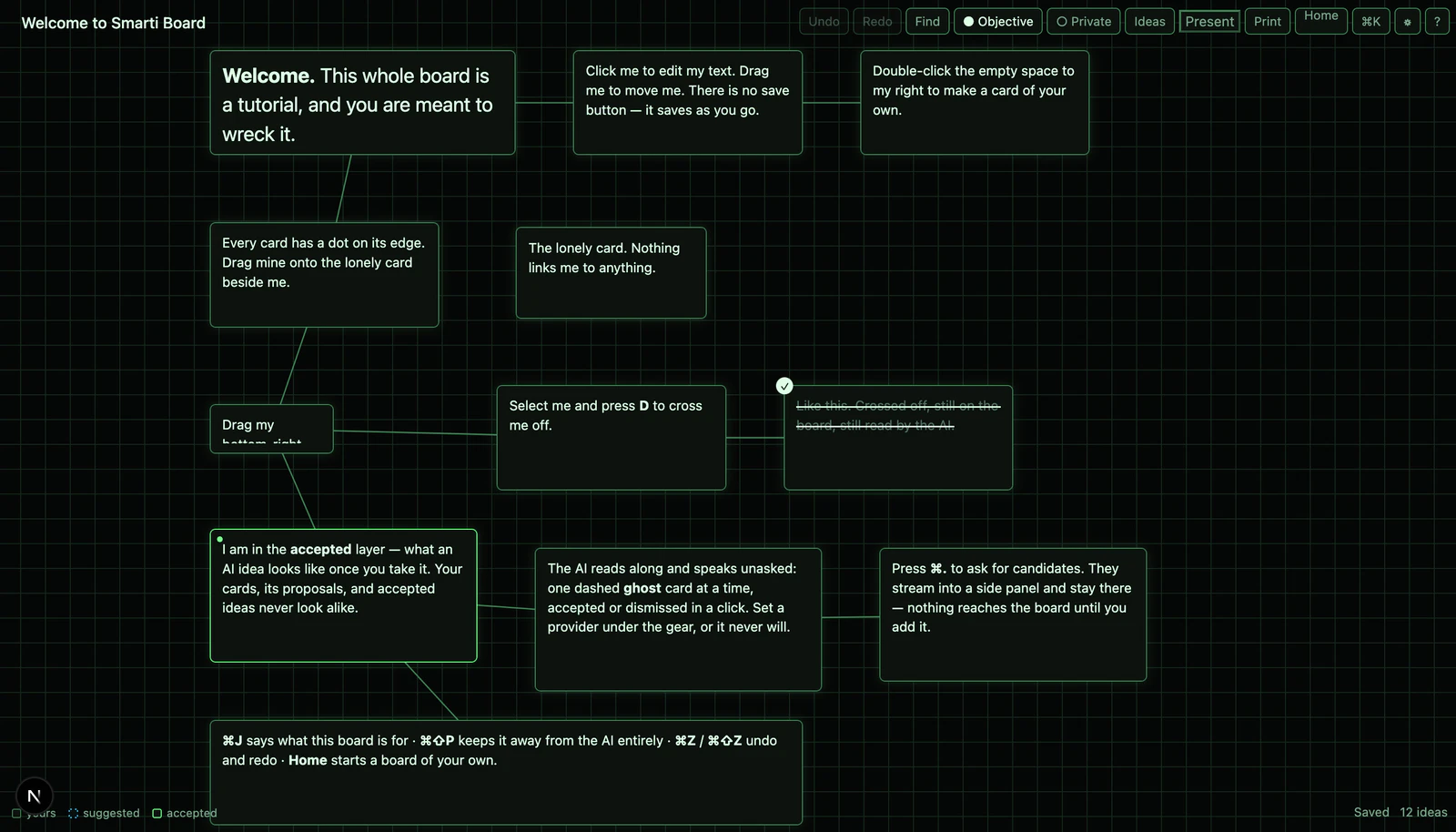
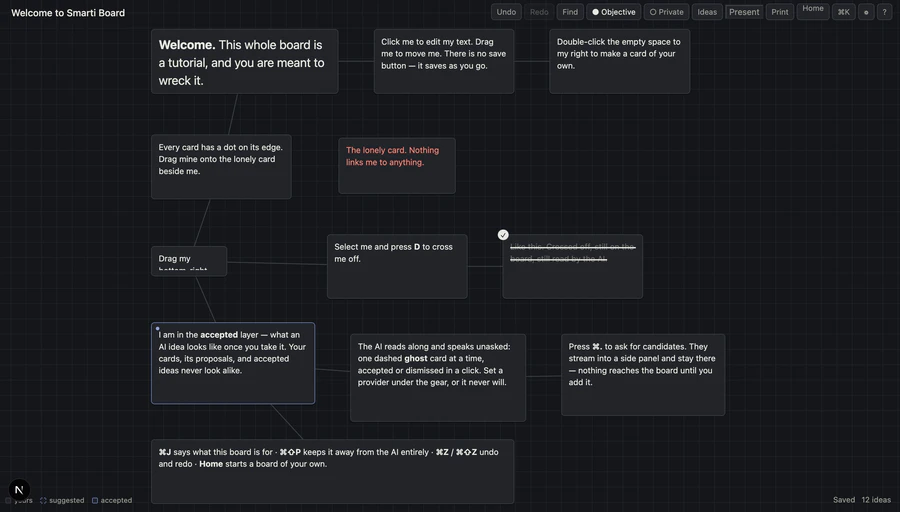
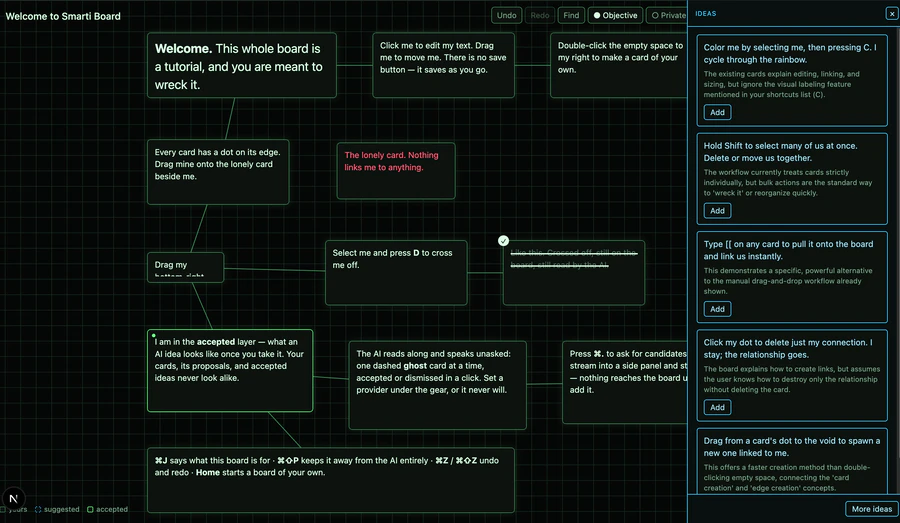
Every color on the board lives in a token, which is the only reason a third theme was a palette and not a rewrite. And a theme is the cheapest thing in the app: no undo step, no prompt, no token. The model never learns what your board looks like.
Yours to run.
One process, one SQLite file, no external services. The database is created on first run — no setup step, nothing to seed, no accounts.
- Rather not touch a terminal? The desktop app ships installers for Windows, macOS and Linux — download, install, open. Same boards, same one-file database. (The Windows and Linux builds are unsigned; the OS will mention it.)
- start.sh checks your Node (22–26) and, if it can't be used, downloads its own into ./.node — no sudo, no version manager, nothing outside the cloned folder.
- Your boards and your API key live in one file you can back up, move, or delete. SMARTI_DB_PATH if you want it elsewhere.
- Works fully offline with Ollama — the assistant included.
AGPL-3.0-only. Self-host it freely; if you run a modified version as a network service, the source goes back out.
View on GitHub ↗